
Download MacSoup – Offline Newsreader for Mac, Secure, Free Trial
Overview
MacSoup is a practical offline newsreader designed exclusively for macOS users who still enjoy the classic Usenet experience. First introduced to the catalog in 2005, the application has matured into a lightweight yet capable tool that lets you browse, read, and post to newsgroups without an active internet connection. The current version, 2.8.3, was last updated on December 16 2009 and continues to support both modern and legacy versions of macOS, including Snow Leopard and earlier releases.
Although the software is offered as a trial, its core functionality—including article caching, search, and multipart message handling—is fully operational, giving users a realistic sense of what a permanent installation would feel like. The program is built in English, requires far less disk space than many competing internet utilities, and integrates seamlessly with macOS services such as the Address Book and AppleScript. Whether you are a seasoned netizen who prefers text‑based discussion or a newcomer curious about the rich history of Usenet, MacSoup provides a stable, secure platform that respects the Mac ecosystem’s design principles.
Key Features and What Sets MacSoup Apart
- Offline Reading Capability: Download entire newsgroup threads for later consumption, ideal for users with intermittent connectivity.
- Address Book Integration: Directly pull contacts from macOS Address Book, with recent fixes that prevent crashes caused by corrupted address entries.
- AppleScript Support: Full scripting dictionary re‑enabled for Leopard, allowing automation of posting, searching, and archiving tasks.
- Snow Leopard Services Menu: Enhanced services integration lets you share articles via macOS’s native share sheet.
- Efficient Storage Management: Uses minimal disk space; articles are compressed and indexed for rapid retrieval.
- Multiplatform Compatibility (Mac OS X only): Runs on OS X 10.4 Tiger through 10.6 Snow Leopard, with legacy support for older builds.
- Secure Connection Options: Supports SSL/TLS for NNTP connections, protecting your credentials and data in transit.
- Customizable Filters: Build rules to automatically sort, delete, or highlight messages based on keywords or sender.
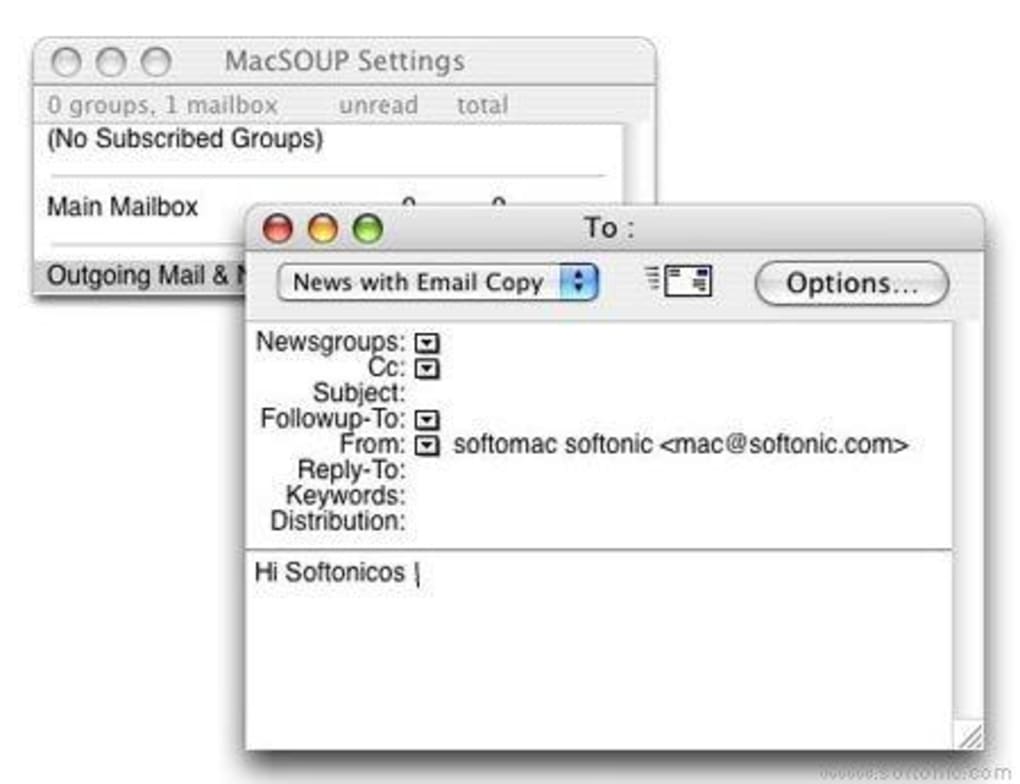
Beyond the checklist, MacSoup distinguishes itself through a clean, native macOS interface that feels familiar to anyone who has used Mail or iChat. The program’s design emphasizes readability: articles are rendered with proportional fonts, and quoting is color‑coded for easy tracking of conversation threads. The built‑in search engine respects wildcards and boolean operators, enabling precise discovery of information across thousands of posts.
For power users, the combination of AppleScript and the Services menu opens up a world of workflow automation, from batch‑downloading of selected groups to auto‑reply scripts for frequently asked questions. The recent patch that addresses sluggishness in large address books ensures that even users with extensive contact lists experience responsive performance. Overall, MacSoup balances simplicity with depth, making it an attractive option for both casual readers and technical hobbyists who demand control over their Usenet interactions.
Installation, Setup, and Everyday Usage
Getting MacSoup up and running is straightforward, even for users who are not comfortable with command‑line tools. Follow these steps to install and start using the application:
- Download the Installer: Visit the official download page and click the “Download MacSoup 2.8.3 (Trial)” button. The file arrives as a compressed
.dmgimage, typically under 15 MB. - Mount the Disk Image: Double‑click the
.dmgfile. macOS will mount a virtual disk on the desktop, displaying the MacSoup icon and a shortcut to the Applications folder. - Copy to Applications: Drag the MacSoup icon into the Applications folder. This copies the program to
/Applications/MacSoup.app, making it accessible from Launchpad or Spotlight. - Launch the Application: Open MacSoup from the Applications folder. The first launch may prompt you to confirm that you trust the developer; click “Open” to proceed.
- Configure NNTP Settings: In the Preferences window, enter the address of your NNTP server, username, and password. If your provider offers SSL/TLS, enable the secure connection checkbox.
- Subscribe to Newsgroups: Use the “Subscribe” dialog to browse available groups or enter a specific group name. MacSoup will begin downloading headers, and you can choose to pre‑fetch full articles for offline access.
- Set Up Address Book Sync: Under the “Contacts” tab, enable synchronization with macOS Address Book. The recent fix ensures that even corrupted entries will not cause a crash.
- Automate with AppleScript (Optional): Open the AppleScript Editor, load the MacSoup scripting dictionary, and experiment with sample scripts found in the Help menu.
Once installed, daily usage revolves around three primary actions: browsing, reading, and posting. The left pane displays your subscribed groups, while the central pane lists article headlines. Clicking a headline loads the full message in the right pane, where you can reply, forward, or save the article as a plain‑text file.
MacSoup also offers a “Download for Offline” button that queues selected threads for background retrieval; you can monitor progress in the status bar. To keep your local cache tidy, the “Retention” settings let you define how many days of articles to keep before automatic deletion. Finally, remember to check for updates occasionally; while the last official release was in 2009, community patches occasionally surface on the support forum, offering minor enhancements and bug fixes.
Compatibility, Pros & Cons, and Overall Verdict
MacSoup is built for macOS environments ranging from OS X 10.4 Tiger through OS X 10.6 Snow Leopard. It does not support modern macOS versions (10.7 Lion and later) without unofficial patches, so users on newer systems may need to run the app in a virtual machine or consider alternative newsreaders. The program is a 32‑bit application, which aligns with the architecture of older Macs but may encounter performance limitations on newer hardware. Despite this, the software remains functional on supported OS versions, and its lightweight nature ensures it runs smoothly even on machines with limited RAM or slower processors.
Pros
- Low Disk Footprint: Consumes far less space than most internet utilities.
- Robust Offline Access: Allows reading of newsgroup content without an active internet connection.
- Native macOS Integration: Seamlessly works with Address Book, Services menu, and AppleScript.
- Secure NNTP Connections: Supports SSL/TLS for encrypted data transfer.
- Customizable Filters: Powerful rule‑based sorting for managing large volumes of articles.
Cons
- Outdated OS Support: No official updates for macOS versions newer than Snow Leopard.
- Trial‑Only Licensing: Full functionality requires purchase after the trial period.
- Limited Modern UI Features: Lacks dark‑mode support and retina‑optimized graphics.
- Potential Compatibility Issues: May need virtualisation on recent hardware.
- Static Feature Set: No recent feature additions beyond minor bug fixes.
In summary, MacSoup shines as a dedicated offline newsreader for legacy macOS systems. Its integration with native macOS services, low resource consumption, and secure NNTP support make it a solid choice for users who still cherish Usenet. However, the lack of updates for newer macOS releases and the trial‑only distribution model may deter those seeking a long‑term solution. If your Mac runs OS X 10.6 or earlier and you value offline reading, MacSoup remains a practical, secure, and easy‑to‑use option.
Overall Rating: 4 out of 5 stars
Frequently Asked Questions
Can MacSoup run on macOS Catalina or later?
Officially, MacSoup supports OS X 10.4 through 10.6. It is a 32‑bit application, so it will not run natively on macOS Catalina (10.15) or later, which require 64‑bit apps. Users can run it in a virtual machine with an older macOS version, but native support is not available.
Is the trial version limited in functionality?
The trial version includes all core features such as offline downloading, address book integration, and AppleScript support. However, after the trial period expires, you must purchase a license to continue using the software without interruption.
How does MacSoup handle SSL/TLS connections?
MacSoup includes built‑in support for secure NNTP connections. In the Preferences pane, simply enable the “Use SSL/TLS” option and provide the appropriate port (usually 563). This encrypts both your login credentials and the data transferred between your Mac and the NNTP server.
Can I automate tasks with AppleScript?
Yes. The MacSoup scripting dictionary was restored for Leopard and later, allowing you to write AppleScript scripts for actions like batch‑downloading groups, auto‑replying to messages, or exporting articles. Sample scripts are provided in the Help menu.
What are the system requirements for MacSoup?
MacSoup requires macOS 10.4 Tiger or later (up to 10.6 Snow Leopard). It runs on both PowerPC and Intel Macs, needs at least 256 MB of RAM, and occupies less than 20 MB of disk space after installation.
Conclusion and Call to Action
If you own a Mac running OS X 10.6 or earlier and still enjoy diving into Usenet newsgroups, MacSoup offers a reliable, secure, and lightweight solution. Its offline capabilities, tight integration with macOS services, and support for secure NNTP connections make it a standout among legacy newsreaders. While the lack of support for modern macOS versions limits its audience, the software remains a valuable tool for enthusiasts who appreciate the classic Usenet experience.
Ready to explore the archives of the internet’s oldest discussion platform? Download the MacSoup trial now, test its features, and decide if it fits your workflow. Secure, offline, and built for the Mac – MacSoup is waiting for you.







